Practical application guide · Examples are illustrative unless identified as catalog data.
Two ways to collect contact data
Touch-trigger probing records individual points when the stylus contacts the part. Scanning collects a series of points as the stylus follows a surface. Both require a planned measurement strategy: where to measure, how to approach the surface and how the software evaluates the resulting data.
For a routine built around hole locations, planes and discrete dimensions, touch-trigger probing may provide the required information. When the inspection needs a more detailed picture of form or a surface profile, scanning can supply denser coverage along the chosen path.
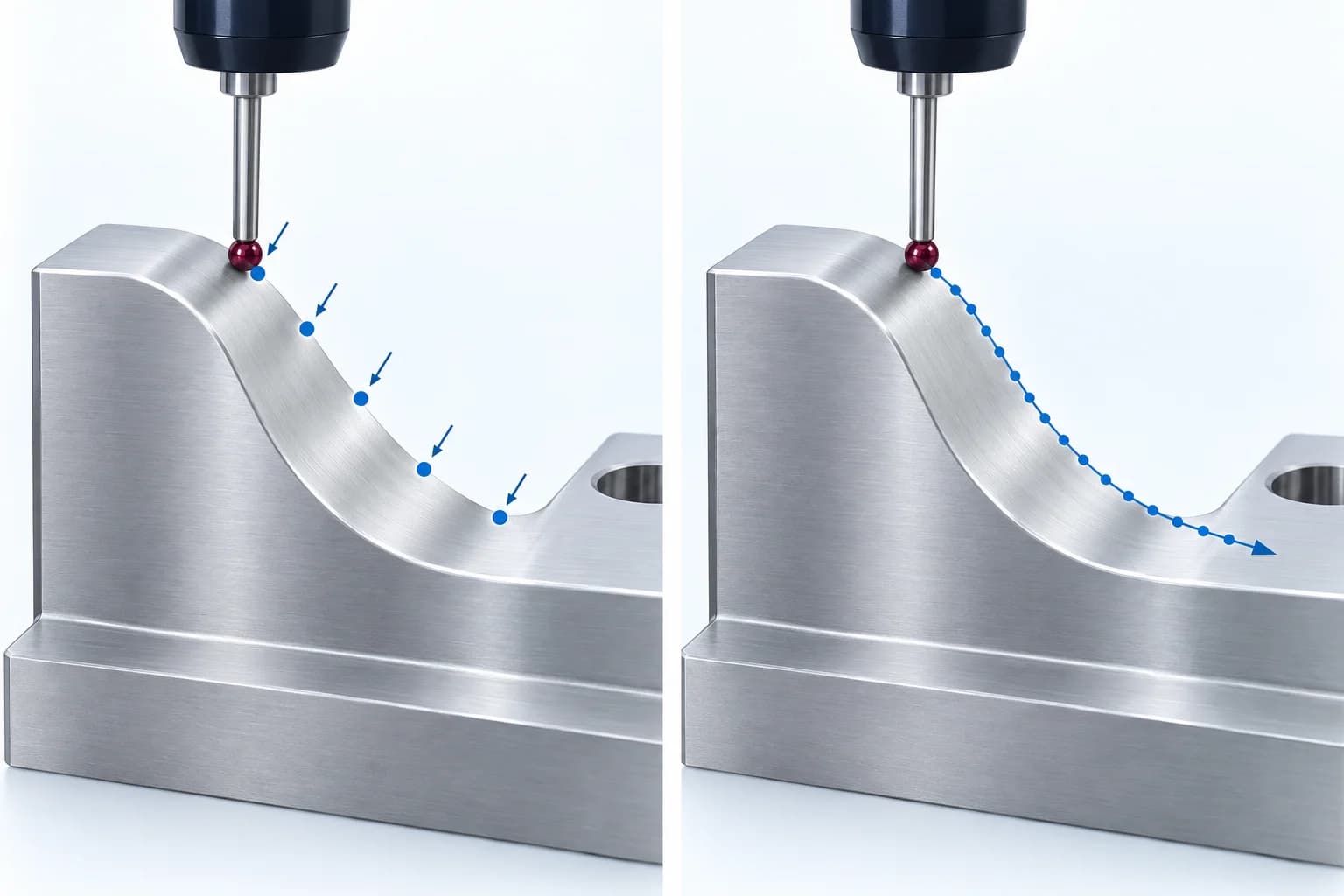
Individual contacts at selected positions.
Closely spaced samples along a contact path.
Concept illustration · Blue marks represent sampled data, not laser light. Coverage and evaluation must match the inspection task.
| Inspection need | Touch-trigger | Scanning |
|---|---|---|
| Discrete features | Selected contact points define each feature. | A continuous path can sample the feature. |
| Form and profile | Point placement determines which areas are sampled. | Denser path data helps examine variation along a surface. |
| Inspection routine | Plan approaches, points and retract moves. | Plan access, scanning paths and data evaluation. |
Application example: a housing with a bearing bore
Illustrative planning example: a machined housing drawing asks for the position of a bearing bore relative to a mounting face and locating features. It also includes a circularity requirement on the bore. These are different inspection questions, even though they concern the same feature.
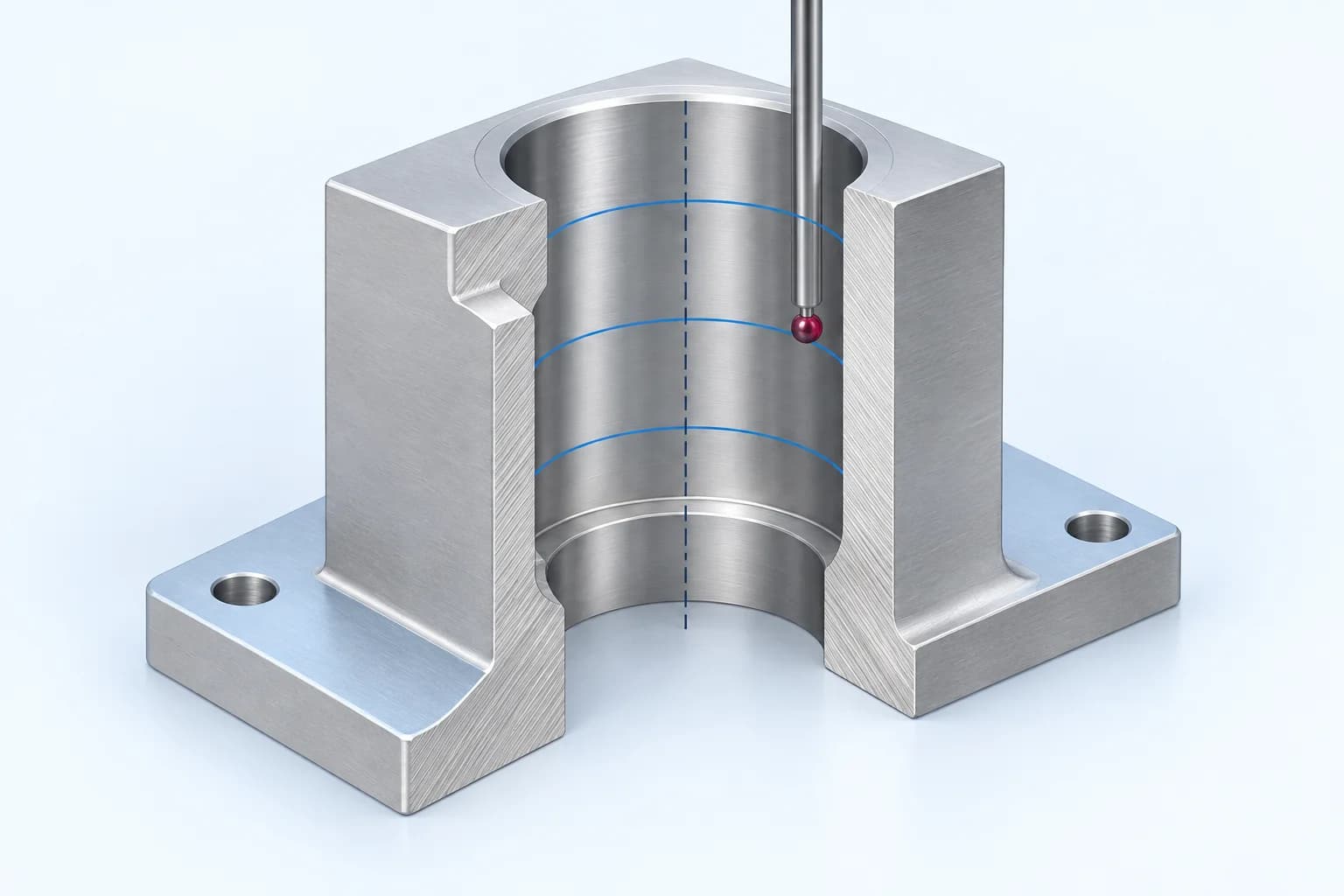
Relate the evaluated bore axis to the drawing's datum system.
Review suitable sections at the depths required by the inspection plan.
Concept illustration · Blue arcs show example sampling sections. Their number and spacing are illustrative; a single section does not describe the full bore.
First establish the drawing's datum system. For the position result, discuss points or scans at suitable depths so the evaluated bore axis represents the required feature. For circularity, plan section scans at the locations needed by the drawing or inspection plan. A single circle does not describe variation over the entire bore length.
Bring a section view showing the bore entrance, depth and internal shoulder. The stylus must reach the measurement region while its stem and probe body clear the part. If access requires another tip or head angle, include that change and its qualification in the proposed routine.
Review coverage before counting points
Write the sampling plan beside the drawing: which faces, depths and paths will be measured, and why. A dense path at one height leaves other heights unsampled. Discrete contacts away from a local surface defect may not describe that defect. Sampling must follow the inspection question.
Ask to review the plotted data and reported feature together. Record the fitting method, filtering and treatment of outliers in the approved routine. If proposed programs produce different results, first check whether their alignment, coverage and evaluation settings are comparable.
- Mark datum features and reported characteristics on the drawing.
- Identify accessible measurement regions and any excluded areas.
- Agree how section locations, point spacing and evaluation settings will be documented.
Match the complete measurement system
A scanning module is one part of a measurement chain. The probe head, module, stylus, controller and inspection software must support the intended workflow together. Check the machine configuration and the specified performance for the selected measuring mode.
For an existing CMM, begin with its current hardware and software details. A probe change can require an interface or controller change and an application review. Do not assume that a component fits an existing system simply because its mechanical connection appears suitable.
Probe selection belongs within the machine, control and software configuration.
Physical sensing assembly
- Probe head
- Probe module
- Stylus
Review head orientation, module and stylus reach together.
Controller
Coordinates supported probing and machine operation.
Measurement software
Defines the routine, evaluates measurements and reports results.
Bring these questions to a configuration review
Use one representative part and its drawing to make the discussion concrete. Where cycle time matters, review the proposed routine with its actual feature access, point strategy and reporting requirements.
- Which dimensions, form controls and profiles must be reported?
- What are the tolerances, part material and surface condition?
- Can the selected stylus reach every feature without a collision?
- Which probe head, controller and software are already installed?
- What evidence will confirm the configured system meets the inspection requirement?
Compare the complete inspection cycle
To compare proposed routines, ask the application team to time the same scope: loading and alignment, probing, head or stylus changes, any required qualification, and report generation. A sensor data rate does not tell you the time to produce the required inspection report.
Request a representative-part demonstration with the intended stylus configuration. Include the hardest-to-access feature and agree the evidence needed for each critical characteristic. Some scanning systems also acquire discrete points, so a review can consider both methods within one inspection program; confirm the supported modes for the actual system.
Measuring is one part of the work needed to deliver an inspection result.
01 Load & align
Fixture the part and establish its coordinate system.
02 Measure
Run the required features, paths and probe movements.
03 Review & report
Evaluate the results and prepare the inspection output.